Video Interview Tips: How to Look and Sound Ready on Camera

Jatin Kashyap
Growth Lead, Acrapath

Practical video interview tips: set up your camera, light and sound, prepare for live and one-way video interviews, answer clearly on screen and handle technical problems calmly.
Key Takeaways
The best video interview tips come down to three things: a tested setup, prepared answers and on-camera habits like looking at the lens and speaking slightly slower.
Put the camera at eye level, the light in front of you and use a headset or earphones with a mic; these 3 fixes solve most video problems.
Prepare for 2 formats: live video interviews and one-way recorded interviews, which often give you only 30-60 seconds to think per question.
Keep answers to 1-2 minutes using the STAR method, because long answers feel longer on screen.
Save the interviewer's phone number or email before you start, so you can recover quickly from a dropped call.
Your interview starts in ten minutes. You open the link, and your face appears on screen: lit from behind, camera pointing at your chin, a pile of laundry in the corner. Your microphone echoes.
Video interviews are now a normal part of hiring, from first screening calls to final rounds with managers in other cities or countries. They save time for everyone, but they add new ways for small things to go wrong.
The good news is that almost every video problem is preventable with a little preparation.
This guide covers how to set up your space, what to wear, how to prepare for live and one-way video interviews, how to answer clearly on camera, and what to do when the technology fails.
What Is a Video Interview?
A video interview is a job interview held over a video platform instead of in person. It can be live, with one or more interviewers on the call, or one-way, where you record answers to set questions and the employer reviews them later.
Employers use video interviews for screening, remote roles, candidates in other cities and panel rounds where interviewers work from different offices.
Live vs One-Way Video Interviews
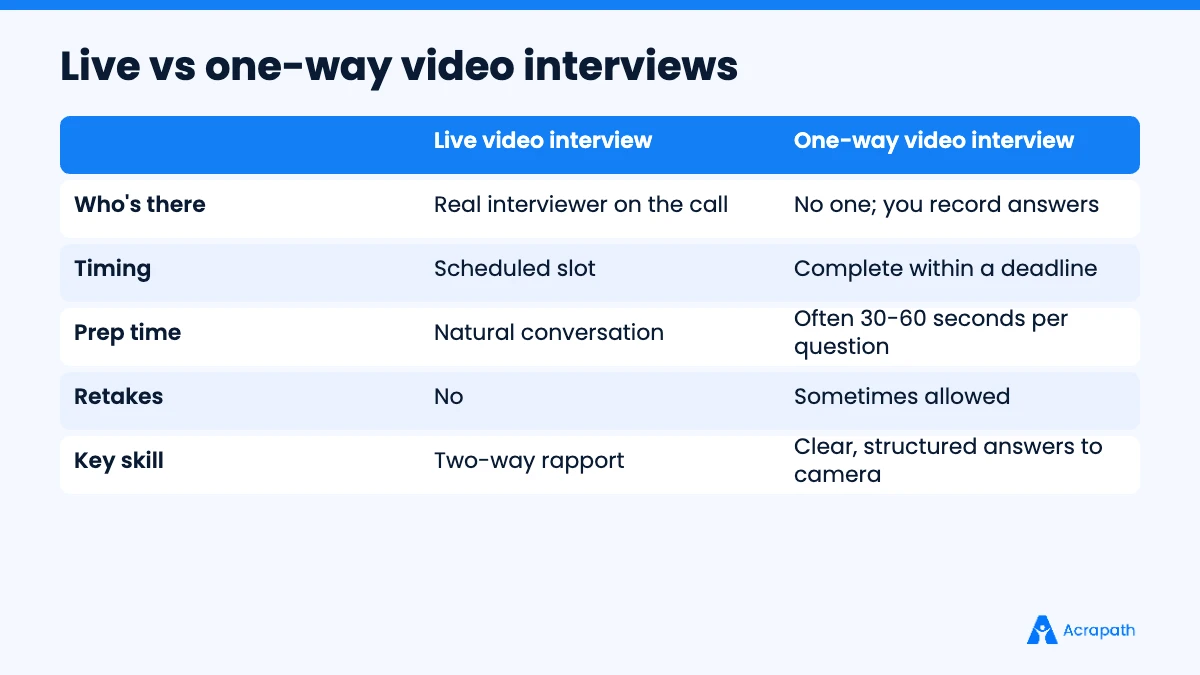
Both formats test the same things as in-person interviews: your skills, your motivation and how clearly you communicate. The difference is that you also need to manage the technology and come across well on camera.
Video Interview Tips: Your Setup
Camera
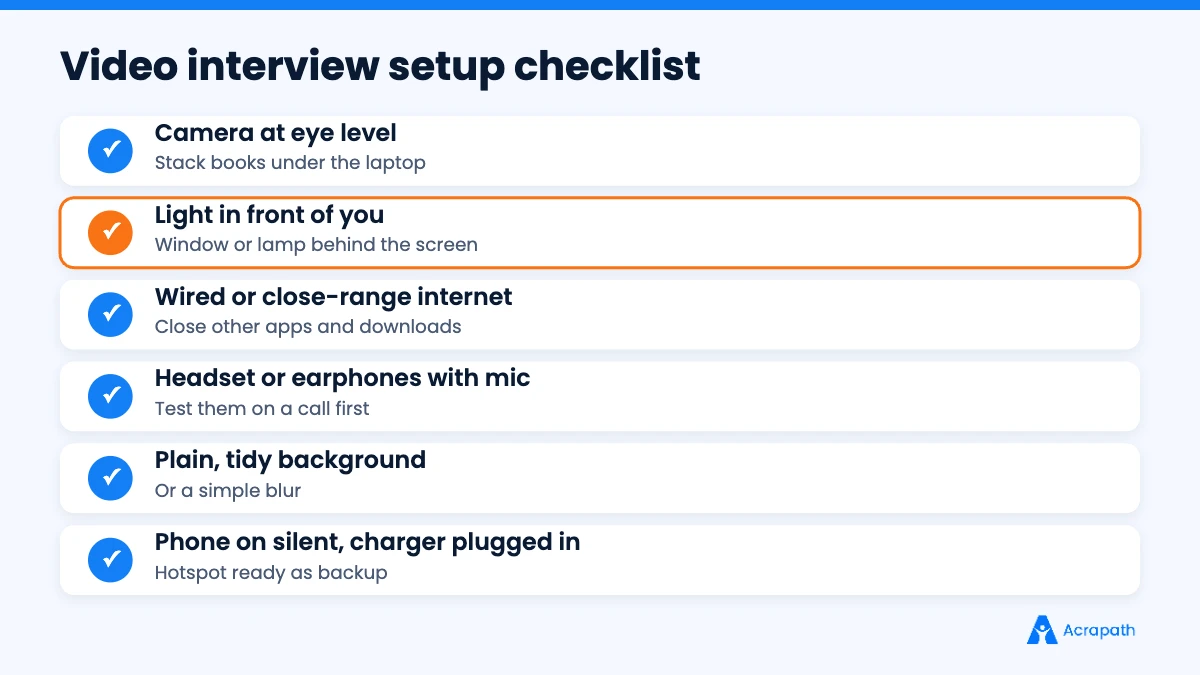
Raise your laptop so the camera sits at eye level. A stack of books works perfectly. Sit far enough back that your head and shoulders fill the frame, with a little space above your head.
Lighting
Face a window or place a lamp behind your screen. Light from behind makes you a silhouette; light from overhead creates shadows. Test at the same time of day as your interview, because daylight changes.
Sound
Use a headset or wired earphones with a microphone. Laptop microphones pick up echo and background noise. Choose the quietest room you can and close windows facing the street.
Internet
Sit close to your router, or use a wired connection if you can. Close downloads, streaming and unused apps. Keep a mobile hotspot ready as a backup.
Background
A plain wall, a tidy bookshelf or a simple background blur all work. Remove anything distracting or personal. Avoid sitting with a bright window directly behind you.
Test Your Technology the Day Before
Most platforms let you test your audio and video before joining. The help centres for Zoom, Google Meet and Microsoft Teams explain how to check your camera, microphone and speakers.
Do a full test run:
Install or update the platform the interviewer will use.
Join a test call with a friend and ask how you look and sound.
Check your display name; use your full professional name.
Learn where the mute, camera and screen-share buttons are.
Charge your laptop and keep the charger plugged in during the call.
Save the interviewer's phone number and email somewhere you can see them.
What to Wear for a Video Interview
Dress as you would for an in-person interview at that company. For most office roles, that means smart casual or business casual.
Wear solid colours. Fine stripes and busy patterns can flicker on camera.
Choose a top that contrasts with your background.
Dress fully, not just from the waist up. It helps you feel professional, and you won't be caught out if you need to stand.
Keep jewellery simple so it doesn't make noise near the microphone.
How to Prepare Your Answers
Preparation matters even more on video, because pauses and rambling feel longer on screen.
Research the company and role. Know what they do, recent news and how your skills fit.
Prepare 5-6 stories you can adapt to different questions: a success, a failure, a conflict, a time you learned something fast, a time you led something.
Use the STAR method: Situation, Task, Action, Result. Keep each answer to one or two minutes.
Practise your introduction. Our guide to answering "Tell me about yourself" has sample answers you can adapt.
Prepare common questions. See our HR interview questions and answers, and if your role is technical, our plan for preparing for a technical interview.
For a full step-by-step plan, from research to follow-up, read our interview preparation guide.
On-Camera Habits That Make a Difference
Small habits help you come across as confident and engaged:
Look at the camera when you speak. It creates eye contact for the interviewer. Glance at the screen when listening.
Move the interviewer's video window just below your camera so your eyes don't drift.
Speak slightly slower than usual. Audio delays make fast speech harder to follow.
Pause before answering. A two-second pause prevents talking over the interviewer.
Nod and react. Small visual signals show you're listening, especially when you're muted.
Keep notes short and nearby. A few keywords on a sticky note beside the camera work better than a script.
Sit upright and still. Avoid swivel chairs that tempt you to rock.
Tips for One-Way Video Interviews
One-way interviews feel strange at first because nobody reacts. These tips help:
Read the instructions carefully. Check the number of questions, time limits and whether retakes are allowed.
Use the practice question if one is offered.
Look into the camera as if a person were there.
Structure every answer. Start with a one-line direct answer, add one example, then close with the result.
Watch the timer, but don't rush. Aim to finish with a few seconds to spare.
Complete it early, well before the deadline, in case of technical issues.
Sample Answer Structure for Video
Here's how a strong one-minute answer to "Why do you want this role?" might sound:
I'm applying because this role combines two things I enjoy most: analysing customer data and turning it into practical changes. In my current job, I noticed that 30% of support tickets came from one confusing checkout step. I mapped the issue, worked with the product team on a fix and tickets on that step fell by half within two months. I'd love to do that kind of work at a company like yours, where customer experience is central to the product.
It's direct, specific and finishes with a result.
What to Do If Something Goes Wrong
Technical problems happen to everyone. Interviewers judge how you handle them.
Problem | What to do |
|---|---|
Video freezes | Say so calmly: "Sorry, you froze for a moment. Could you repeat the last part?" |
Audio drops | Type in the chat that you can't hear, then try reconnecting your headset |
Call disconnects | Rejoin at once; if that fails, call or email the interviewer |
Background noise | Mute when not speaking and apologise briefly if needed |
Someone walks in | Stay calm, apologise briefly and continue |
Before the interview, tell people at home when you'll be on a call, and put a note on the door.
A Day-Before and Hour-Before Checklist
The day before:
Confirm the time zone, platform and link.
Test your setup and do a practice run.
Prepare your outfit, notes and a glass of water.
Re-read the job description and your resume.
One hour before:
Restart your laptop and close unneeded apps.
Set your phone to silent, away from the microphone.
Check light and background.
Join five minutes early.
Video Interviews for Remote and International Roles
If you're interviewing for a remote job or with a company in another country, the video interview is also a test of how you'd work day to day. Show you're ready:
Confirm the time zone in writing. Repeat the time back in both zones: "Tuesday 4 PM UK time, 9:30 PM IST."
Mention your remote set-up. A sentence on your workspace, internet backup and working hours reassures the interviewer.
Show strong written communication. Your emails before and after the call count as much as the call itself.
Prepare for screen sharing. You may be asked to walk through a portfolio, code or a document live, so keep files open and notifications off.
Speak clearly, not fast. With different accents and audio delays, clarity beats speed every time.
Panel Video Interviews
Some rounds include three or four interviewers on one call. Address the person who asked each question, but glance at the camera to include everyone. Note names at the start so you can refer to people correctly, and keep answers tight, because panels often run on a strict timetable.
Common Video Interview Mistakes
Joining late because of a software update. Update the day before.
Reading answers from the screen. Interviewers notice your eyes moving.
Poor lighting or a low camera. These are the easiest fixes and the most common problems.
Forgetting you're on camera. Stay engaged even while others are speaking.
No questions for the interviewer. Prepare two or three thoughtful ones.
After the Interview
Send a short thank-you email within 24 hours. Mention one specific point from the conversation and restate your interest. Our thank-you email templates make this quick.
Then note what went well and what you'd change for next time, especially about your setup.
Conclusion
Video interviews reward preparation. Set up your camera at eye level with light in front of you, use a headset, test everything the day before, and practise short, structured answers you can deliver while looking at the lens.
Your next step: do a 10-minute test call with a friend today and fix the one thing that looks or sounds weakest.
When you're ready for your next interview, browse jobs on Acrapath and apply to roles that match your skills.
- #video interview tips
- #online interview
- #virtual interview
- #one-way video interview
- #interview preparation
Frequently asked questions
How should I prepare for a video interview?
Test your platform, camera, microphone and internet a day before. Set up a quiet space with light in front of you and the camera at eye level. Research the company, prepare examples for common questions, keep brief notes nearby and log in five minutes early.
What should I wear for a video interview?
Dress as you would for an in-person interview at that company, at least from the waist up, though wearing the full outfit helps you feel professional. Choose solid colours rather than busy patterns, which can flicker on camera, and make sure your top contrasts with your background.
Where should I look during a video interview?
Look at the camera when you speak, especially when making key points, so the interviewer feels you're making eye contact. Glance at the screen while listening to read reactions. Placing the interviewer's video window just under your camera makes this easier.
What is a one-way video interview?
A one-way video interview is a recorded interview with no live interviewer. You see written or recorded questions, get a short time to think, then record each answer within a time limit. Recruiters review the recordings later. Practise answering to camera within 60-90 seconds.
What should I do if my internet drops during a video interview?
Stay calm and try to reconnect immediately. If it fails, call or email the interviewer straight away using the contact details you saved beforehand, explain briefly and offer to continue by phone. Interviewers expect occasional glitches; how you handle them matters more.