Time to Hire: 7 Ways to Cut It Without Hiring Worse

Jatin Kashyap
Growth Lead, Acrapath

What time to hire means, how it differs from time to fill, current benchmarks, and 7 practical ways to shorten your hiring cycle without lowering the bar.
Key Takeaways
Time to hire is the number of days from a candidate entering your pipeline to accepting your offer. It measures how fast your process moves.
SHRM's 2025 benchmarking report put the median time to fill at 44 days for non-executive roles.
Employ's platform data found small and mid-size companies took 83.5 days from posting to accepted offer in 2025, against 51.7 days at large enterprises.
Most delays sit in 2 stages: interview scheduling and final decisions.
The 7 fixes below remove waiting, not evaluation, so speed goes up without hurting quality.
You find a great candidate on Monday. You schedule the first interview for next Thursday. The panel round waits for the hiring manager to return from leave. Three weeks later you send an offer, and the candidate has already joined someone else.
Sound familiar? Long hiring cycles cost more than time. They cost you the best people, because strong candidates rarely stay on the market for long.
The good news: most slow hiring isn't caused by hard assessments. It's caused by empty days between steps.
This guide explains what time to hire is, how to calculate it, what current benchmarks look like, and seven practical ways to cut it without lowering your bar.
What Is Time to Hire?
Time to hire is the number of days between a candidate entering your hiring process and accepting your job offer. A candidate "enters" when they apply or when your team first contacts them.
It's one of the core recruitment metrics because it shows how efficiently your team moves a person from interest to offer.
For example, if a candidate applies on 3 March and accepts your offer on 24 March, your time to hire for that role is 21 days.
Time to Hire vs Time to Fill
People often mix up these two metrics. Both end at an accepted offer, but they start at different points.
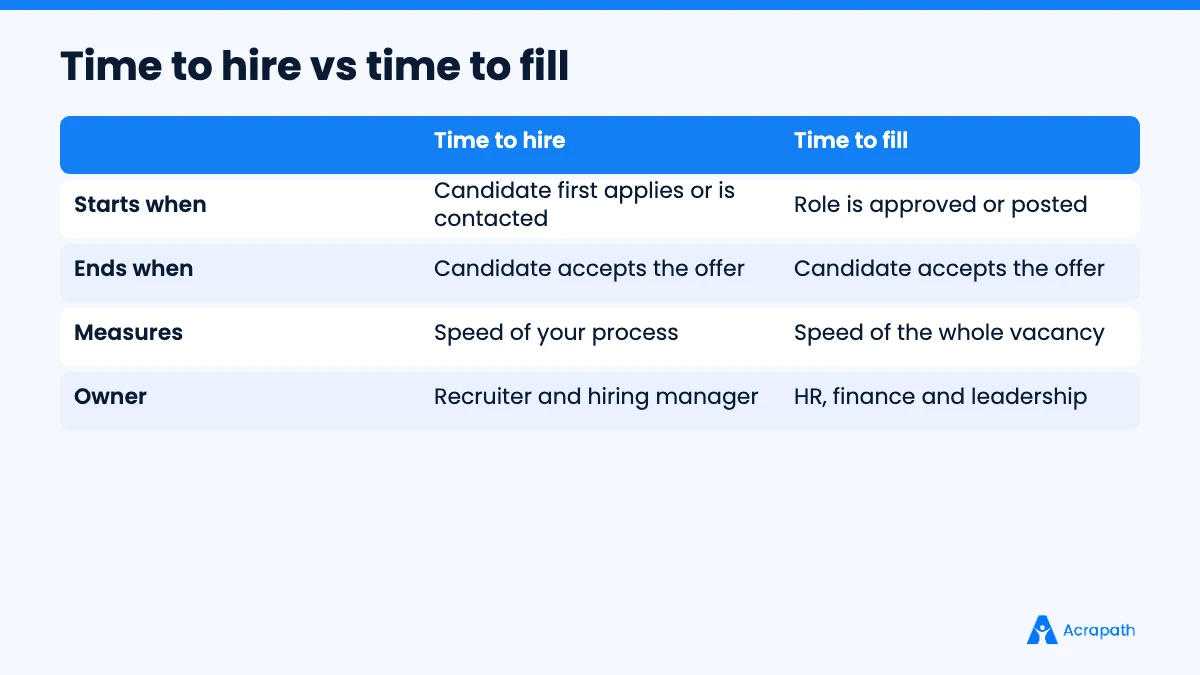
Use time to fill for workforce planning and budgeting, because it shows how long a seat stays empty. Use time to hire to improve your recruiting process, because it isolates the part your team controls.
How to Calculate Time to Hire
The formula is simple:
Time to hire = Date offer accepted − Date candidate entered the pipeline
To get an average for a period:
Average time to hire = Sum of time to hire for all hires ÷ Number of hires
For example, if you made four hires in a quarter that took 18, 25, 31 and 22 days, your average time to hire is 96 ÷ 4 = 24 days.
The real value comes from tracking days per stage:
Stage | What to measure | Typical bottleneck |
|---|---|---|
Applied → screened | Days until first review | Nobody owns screening |
Screened → first interview | Days to schedule | Calendar back-and-forth |
First → final interview | Days between rounds | Panel availability |
Final interview → decision | Days to agree | Slow or missing feedback |
Decision → offer accepted | Days to approve and close | Salary approvals, negotiation |
Once you see stage-level numbers, the fix is usually obvious.
Time to Hire Benchmarks (2025-2026)
Benchmarks differ by source, role and company size, so use them as a rough guide, not a target.
SHRM's 2025 recruiting benchmarking report put the median time to fill at 44 days for non-executive roles and 45 days for executive roles.
Employ's 2025 platform data, reported by HR Dive, found an average of 46.2 days from a candidate's first interaction to an accepted offer, and 63.5 days from job posting to accepted offer.
The same data showed small and mid-size companies took 83.5 days from posting to accepted offer, compared with 51.7 days at enterprises.
The last point matters for growing businesses. Smaller teams often have fewer recruiters, busier founders and no fixed process, so roles drift. That's also where the biggest gains are.
Why a Long Time to Hire Hurts
A slow process creates problems beyond an empty seat:
You lose top candidates. Strong applicants usually have several conversations running at once.
Costs rise. Every extra week adds recruiter hours, job-board spend and lost output. Our guide to cost per hire shows how these add up.
Your team burns out. Colleagues cover the vacant role for longer.
Your employer brand suffers. Candidates talk about slow, silent processes.
7 Ways to Reduce Time to Hire
Each fix below removes idle time. None of them asks you to skip a meaningful assessment.
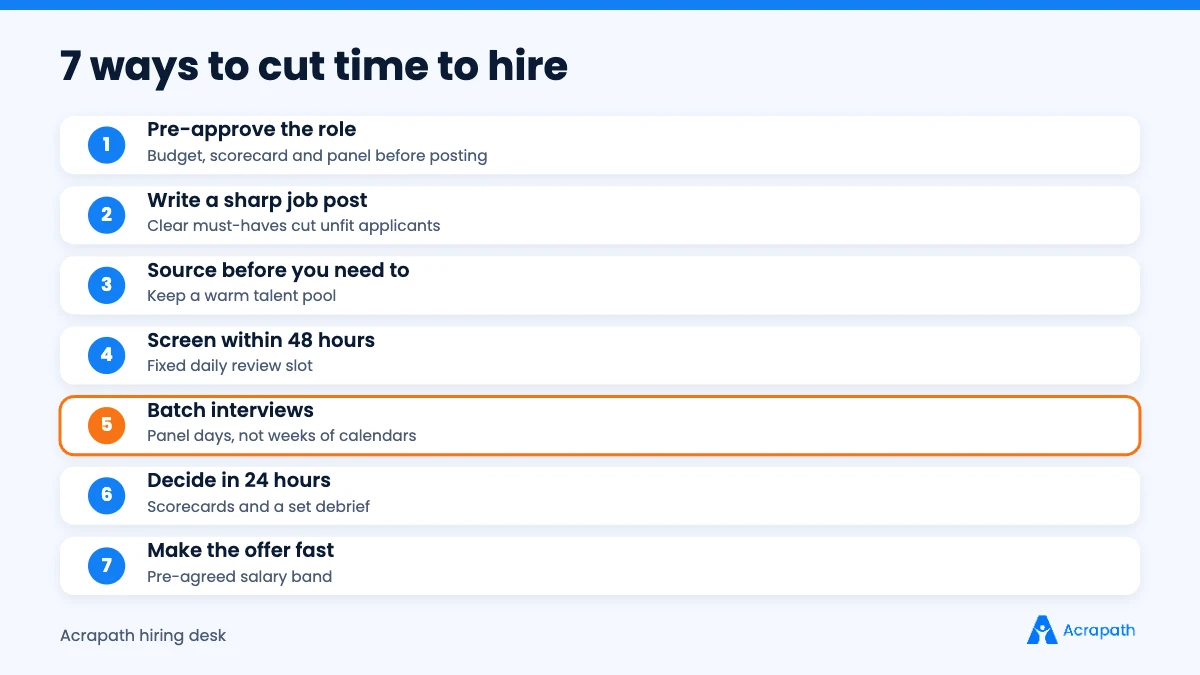
1. Pre-Approve the Role Before You Post
Many hiring cycles stall at the end because salary, headcount or the interview panel was never agreed. Before you post, lock in:
The approved budget and salary band
A one-page scorecard of must-have skills
The interview panel and their available slots
This single habit often saves a week at the offer stage.
2. Write a Job Post That Filters for You
A vague job post attracts hundreds of unfit applicants, and screening them takes days. List three to five true must-haves, the salary range where you can, and the location or remote setup. Our guide on how to screen resumes shows how a clear post makes screening faster too.
3. Build a Talent Pool Before You Need It
The fastest hires come from people you already know: past finalists, referrals and candidates who engaged with your brand. Keep a simple list of strong silver-medal candidates and check in with them every few months.
For more channels, see our list of 11 places to find candidates.
4. Screen Within 48 Hours
Set a fixed daily or alternate-day slot to review new applicants. A 48-hour screening rule alone can cut a week from many processes, and candidates notice the speed.
Short skills tests can replace a first phone round for some roles. Our guide to pre-employment assessments compares the options.
5. Batch Interviews Into Panel Days
Instead of scheduling each interviewer separately, block a half-day where the whole panel meets several shortlisted candidates back to back. One panel day replaces two weeks of calendar juggling.
Video interviews help when candidates or interviewers are in different cities or countries.
6. Decide Within 24 Hours
Delayed feedback is the most common hidden delay. Use a structured interview with a shared scorecard, ask every interviewer to submit scores the same day, and hold a 15-minute debrief within 24 hours of the final round.
Structured interviews also make decisions fairer, because everyone rates the same skills on the same scale.
7. Make the Offer Fast and Clear
If the salary band is pre-approved, you can call the candidate with a verbal offer the same day you decide. Follow with a written offer within 24 hours. Our offer letter template helps you send a complete, clear letter quickly.
Stay in touch during the notice period too. Our case study on reducing offer drop-outs shows how regular contact keeps accepted candidates from backing out.
A Sample 21-Day Hiring Timeline
Here's what a tight but thorough process looks like for a mid-level role.
Day | Step |
|---|---|
Day 0 | Role approved, scorecard and panel confirmed, job posted |
Day 1-7 | Applications reviewed every 48 hours; skills test sent to the shortlist |
Day 8-10 | 20-minute screening calls with 6-8 candidates |
Day 12 | Panel day: 3-4 finalists interviewed back to back |
Day 13 | Debrief and decision |
Day 13-14 | Verbal offer, then written offer |
Day 15-21 | Negotiation, acceptance and notice-period check-ins |
Senior and specialist roles take longer, but the same principle applies: remove the waiting between steps.
Time to Hire by Role Type
Different roles move at different speeds. Comparing a warehouse supervisor with a senior engineer makes little sense, so set separate targets by role family.
Role type | What usually slows it | Realistic focus |
|---|---|---|
High-volume entry roles | Screening hundreds of applicants | Short skills test, group interviews |
Mid-level professional roles | Panel scheduling and feedback | Panel days, 24-hour debriefs |
Specialist technical roles | Small candidate pool | Proactive sourcing, take-home task |
Senior and leadership roles | Many stakeholders, long notice periods | Clear decision owner, early salary approval |
Regulated roles (healthcare, finance) | Licence and background checks | Start verification in parallel with interviews |
A common mistake is to set one company-wide target. Instead, track your own median for each role family and aim to beat it by 20-30% over the next two quarters.
Tools That Speed Up Hiring
You don't need an expensive tech stack, but a few tools remove most of the manual work:
An applicant tracking system or hiring pipeline: shows every candidate's stage, so nobody sits unseen in a spreadsheet.
Scheduling links: candidates pick an interview slot from the panel's shared availability, which ends email back-and-forth.
Skills assessments: short tests filter the shortlist before anyone spends time on calls.
Interview scorecards: shared forms make same-day feedback the default.
Offer templates: a ready-made letter means legal and HR don't start from scratch for every hire.
Automated status emails: candidates get updates at each stage, which reduces drop-outs.
Pick the tool that fixes your slowest stage first. If scheduling eats a week, a scheduling link will do more than a new sourcing tool.
How to Report Time to Hire to Leadership
Leaders care about time to hire because empty seats delay revenue and projects. Make your report short and useful:
Show the trend, not one number. Present the median for the last three to four quarters.
Break it down by stage. A simple bar chart of days per stage shows where the time goes.
Separate role families. Engineering and sales hiring rarely move at the same speed.
Pair speed with quality. Add a quality signal, such as the share of new hires who pass probation or the hiring manager's satisfaction score.
Name one fix for next quarter. "We'll introduce panel days for all mid-level roles" is better than a long list.
Reporting speed and quality together protects you from the trap of hiring fast and regretting it later.
Mistakes That Make Time to Hire Worse
Adding rounds "just to be sure". Each extra round adds a week and rarely changes the decision.
Letting one busy interviewer block everyone. Name a backup for each panel slot.
Going silent on candidates. Silence reads as rejection, and good people move on.
Negotiating salary only at the end. Share the band early to avoid late surprises.
Measuring only the average. Track stage-level days and look at your slowest hires.
How Acrapath Shortens the Process
If your team is small, the fastest fix may be getting help with the busiest stages. Acrapath can source and shortlist verified candidates, and its hiring desk can run screening and interview scheduling for you, so your managers spend time only on the final rounds.
You can also search verified candidates directly in Talbox and manage every applicant's stage in one hiring pipeline, which makes stage-by-stage time tracking far easier.
Conclusion
Time to hire measures how quickly your process moves a candidate from first contact to accepted offer. Most delays come from waiting, not from assessment, so the fixes are practical: pre-approve the role, screen within 48 hours, batch interviews, decide within a day and make the offer fast.
Start by measuring the days each stage takes for your last five hires. The slowest stage is where you'll win the most time.
If you'd like a faster route, Acrapath's hiring desk can run sourcing and shortlisting for you.
- #time to hire
- #recruitment metrics
- #hiring process
- #time to fill
- #recruiting
Frequently asked questions
What is a good time to hire?
A good time to hire is one that beats your own past average and your local market. As a reference point, SHRM's 2025 benchmarking report put the median time to fill for non-executive roles at 44 days. Many simple roles can be filled in two to three weeks with a tight process.
How do you calculate time to hire?
Time to hire is the number of days between a candidate entering your pipeline, by applying or being sourced, and accepting your offer. Calculate it for each hire, then average across all hires in a period. Track it by role and stage so you can see where delays happen.
What is the difference between time to hire and time to fill?
Time to fill counts from the day a role is approved or posted until an offer is accepted. Time to hire counts only from when the hired candidate entered your process. Time to fill shows how long a seat stays empty; time to hire shows how fast your process moves.
Why is my time to hire so long?
Long time to hire usually comes from slow screening, hard-to-schedule interview panels, delayed feedback, or late salary approvals. Measure days spent in each stage. In most companies one or two stages, often interview scheduling and final decisions, cause most of the delay.
Does a faster time to hire reduce quality of hire?
Not if you remove waiting rather than evaluation. Cutting idle days between stages, using structured interviews and agreeing the salary band early speeds things up while keeping the same assessments. Quality drops only when you skip steps that test real job skills.