Learn how to write a resume in 9 steps, with format comparisons, before-and-after bullet examples, ATS tips and US, UK, India and UAE conventions.
Key Takeaways
How to write a resume: pick a format, add a clear header and a 2-3 line summary, list your experience as results-led bullets, add skills and education, then tailor every version to the job description.
Recruiters gave each resume an average of 7.4 seconds on first pass in a 2018 eye-tracking study, so your strongest proof must sit in the top third of page 1.
Jobscan's 2026 ATS report found 97.4% of Fortune 500 companies use an applicant tracking system, so a simple, single-column layout with standard headings still matters.
Most candidates need 1 page (under about 10 years of experience) or 2 pages (senior roles, UK-style CVs); academic CVs can run longer.
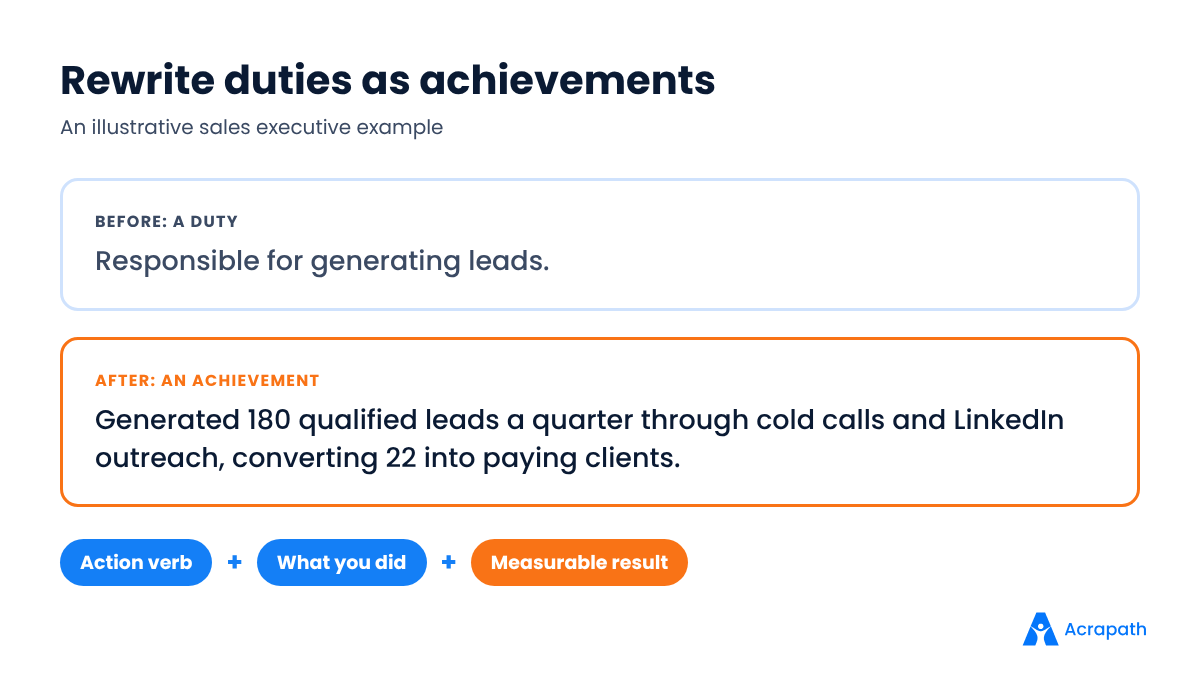
The best bullets follow one pattern: action verb + what you did + measurable result.
You have the skills for the job. Your resume just isn't saying so fast enough.
That's the problem most applicants face. A recruiter opens your file, scans the top half, and decides in seconds whether to keep reading. If your best work is buried in paragraph three, it never gets seen.
The good news: learning how to write a resume is a skill, not a talent. Once you know the structure, every new application takes minutes, not hours.
This guide walks you through the whole process for 2026: choosing a resume format, writing each section, turning weak bullets into strong ones, getting past applicant tracking systems, and adjusting for US, UK, Indian and Gulf conventions. You'll also find links to role-specific guides for sales, software, nursing and design.
What Is a Resume (and How Is It Different From a CV)?
A resume is a short, targeted document, usually 1-2 pages, that shows an employer you can do a specific job. It summarises your most relevant experience, skills, education and results, and it changes for every role you apply to.
A CV (curriculum vitae) means different things in different countries. In the US and Canada, a CV is a long academic record of publications, research and teaching. In the UK, Ireland, much of Europe and many Commonwealth countries, "CV" is simply the everyday word for what Americans call a resume.
In India and the UAE, recruiters use both words, often interchangeably. What matters more is what the employer asks for and the length they expect.
Region | What it's called | Typical length | Photo? | Personal details |
|---|---|---|---|---|
US and Canada | Resume (CV = academic) | 1 page; 2 for senior roles | No | Name, city, phone, email, LinkedIn only |
UK and Ireland | CV | Up to 2 pages | No | No date of birth or marital status needed |
Continental Europe | CV (often Europass) | 1-2 pages | Varies by country | Varies; check local norms |
India | Resume or CV, used interchangeably | 1 page for freshers; 2 for experienced | Optional; follow the employer's request | Keep it minimal; skip religion, caste and family details |
UAE and Gulf | CV | 2 pages is common | Often included | Nationality, visa status and notice period are often listed |
These are common conventions, not rules. In the US, for example, the Equal Employment Opportunity Commission advises employers not to request photos from applicants, which is one reason US resumes leave them out. The UK university admissions service UCAS recommends a CV of no more than two sides of A4. If a job ad states a format, follow the ad.
Resume Format: Chronological vs Functional vs Hybrid
The best resume format for most people is reverse-chronological: your latest role first, then older roles. It's what recruiters expect and what applicant tracking systems read most reliably.
The other two formats have narrower uses. Here's how they compare.
Format | How it's organised | Best for | Watch out for | ATS-friendly? |
|---|---|---|---|---|
Chronological (reverse) | Work history first, newest role at the top | Most professionals with a steady work history | Gaps and short stints are visible | Yes, the safest choice |
Functional (skills-based) | Skill groups first; job titles listed briefly or not at all | Rarely the best choice; sometimes long career breaks | Recruiters may assume you're hiding something | Often parsed poorly |
Hybrid (combination) | Strong skills/highlights section, then chronological history | Career switchers, freshers with projects, people returning to work | Can get long; keep the skills part short | Yes, if headings are standard |
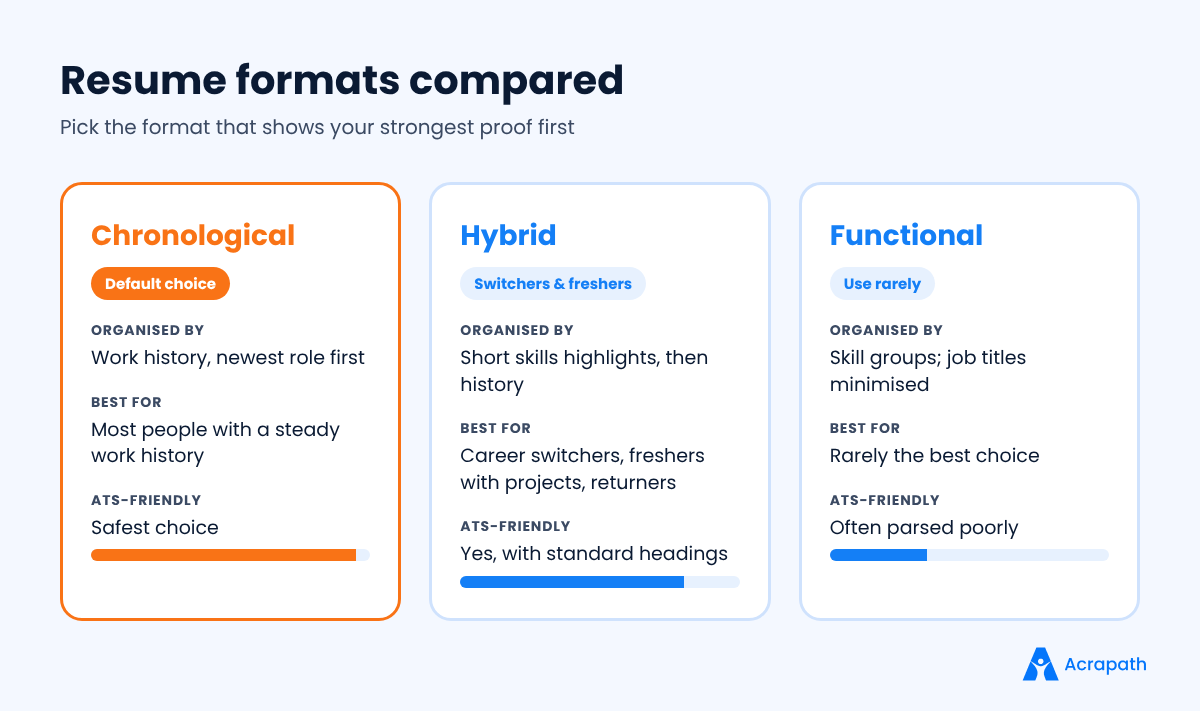
A quick rule: if your last two or three job titles already match the role you want, use chronological. If they don't, use hybrid and lead with relevant projects and skills. Avoid a purely functional resume unless a career coach has a specific reason for it.
How to Write a Resume Step by Step
Here's how to write a resume in nine steps. Work through them in order the first time; after that, you'll mostly repeat steps 1 and 9 for each application.
Step 1: Study the Job Description First
Before you write a word, copy the job ad into a document and highlight three things: required skills, tools, and outcomes the employer cares about.
These become your keywords. If the ad says "stakeholder management" and "SQL", those exact phrases should appear in your resume, as long as they're true for you.
Pitfall: writing one generic resume and sending it everywhere. Recruiters can tell, and so can software.
Step 2: Choose Your Format and Layout
Pick a format from the table above. Then set up a clean layout: one column, 10-12 pt body text, a standard font such as Calibri, Arial or Georgia, and margins of about 0.5-1 inch (1.3-2.5 cm).
Use clear section headings in bold. Leave white space between sections so the eye can jump around.
Pitfall: fancy two-column templates with icons, skill bars and text boxes. They look good to you and confusing to a parser.
Step 3: Write a Clean Header
Your header holds your contact details and nothing else. Include:
Full name in a slightly larger font
Target title (for example, "Digital Marketing Executive")
City and country (no full street address)
Phone number with country code if you're applying abroad
Professional email (firstname.lastname style)
LinkedIn URL, plus a portfolio or GitHub link if it's relevant
Pitfall: putting contact details in the document's header or footer area. Some systems skip those zones.
Step 4: Add a 2-3 Line Professional Summary
Your summary answers one question: why should this employer keep reading? Keep it to 2-3 lines, and write it last, once you know your strongest points.
A useful structure is: who you are + years of experience + your biggest proof + what you want next.
Customer success specialist with 4 years in B2B SaaS. Cut churn on a 120-account portfolio from 9% to 5% in one year. Looking to lead a small CS team at a growth-stage product company.
If you're a fresher, replace years of experience with your degree, key project or internship. Our guide on writing a resume with no experience has summary examples for students and graduates.
Pitfall: an "objective" that only says what you want ("Seeking a challenging role in a reputed organisation"). It tells the reader nothing about you.
Step 5: Write Your Work Experience as Achievements
This is the heart of your resume. For each role, list the job title, company, city and dates (month and year), then 3-6 bullet points.
Write each bullet with the same pattern: action verb + what you did + measurable result. Lead with the result when it's impressive.
Start with a strong verb: led, built, cut, grew, launched, negotiated, automated, trained.
Add a number wherever you honestly can: revenue, percentage, time saved, team size, volume handled.
Put your most relevant bullet first under each role, not your oldest task.
Give recent roles more bullets than older ones.
If you can't find a number, describe scale or scope instead: "for a 40-bed ward", "across 3 regional teams", "for clients in the UK and UAE".
Pitfall: listing duties copied from your job description ("Responsible for handling clients"). Duties say what you were supposed to do; achievements prove you did it well.
Step 6: Build a Skills Section That Matches the Role
Keep your skills section short and specific: 8-15 items, grouped if that helps (for example, "Tools", "Languages", "Certifications").
Prioritise hard skills the job ad names, such as Excel, Salesforce, Python, Figma or IV cannulation. Soft skills like "communication" and "teamwork" carry more weight when you prove them inside your experience bullets.
Skills are shifting fast. The World Economic Forum's Future of Jobs Report 2025 found that employers expect 39% of workers' core skills to change by 2030, so update this section every time you learn a new tool.
Pitfall: rating yourself with stars or bars ("Excel: 4/5"). Nobody knows what a 4 means, and parsers can't read graphics.
Step 7: Add Education the Right Way
List your degree, institution, city and graduation year. Experienced professionals put education below experience; freshers and recent graduates put it near the top.
Add your grade, CGPA or class only if it's strong or the employer asks. Many Indian campus recruiters do ask, so include it on fresher resumes in that market. Skip school marks once you have a degree and some work experience.
Pitfall: listing every course you took. Pick 2-3 relevant modules or projects instead.
Step 8: Add Extra Sections Only If They Help
Optional sections earn their place when they prove you can do the job. Good candidates for extra sections:
Projects (essential for freshers, engineers and designers)
Certifications and licences (essential for nursing, finance and some IT roles)
Awards with context ("Top 3 of 45 sales reps, Q2 2025")
Languages, with level, when the role is global or customer-facing
Volunteering if it shows relevant skills
Hobbies rarely help unless they connect to the role. "References available on request" is no longer needed anywhere; employers will ask.
Step 9: Tailor, Proofread and Save Correctly
Before you hit send, compare your resume with the job ad one more time. Does your summary mention the role? Do your top bullets use their language? Are the must-have skills visible?
Then proofread twice: once on screen, once read aloud. Check dates, spellings of company names and consistent formatting.
Save as PDF unless the employer asks for Word (.docx). Name the file clearly: Firstname-Lastname-Resume-Role.pdf.
Resume Sections: What to Include and What to Leave Out
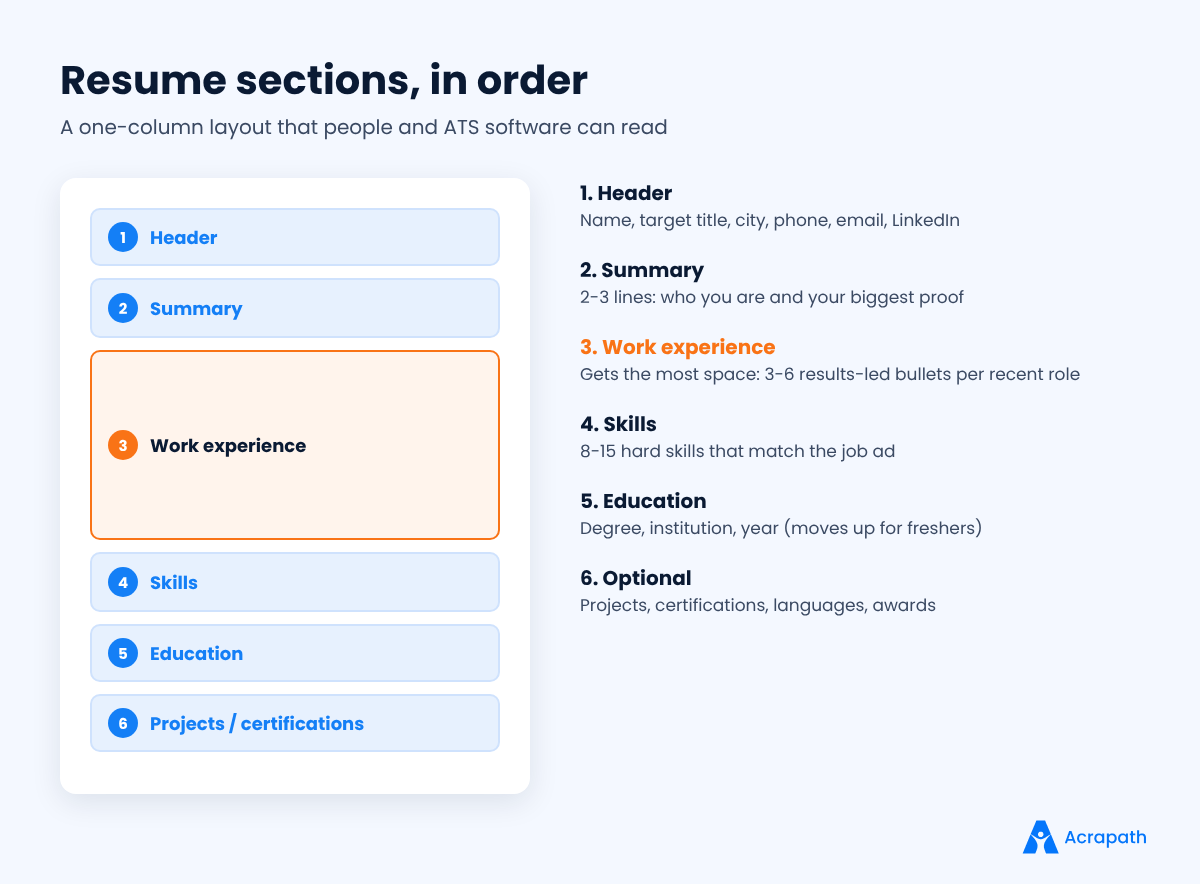
Every resume needs five core sections: header, summary, experience, skills and education. Everything else is optional and depends on your career stage.
Section | Fresher / student | Experienced professional | Career switcher |
|---|---|---|---|
Header | Required | Required | Required |
Summary | 2 lines on degree and goal | 2-3 lines on biggest proof | 2-3 lines bridging old and new field |
Experience | Internships, part-time work | Main section, near the top | Keep, reframe transferable results |
Projects | Near the top | Optional | Strongly recommended |
Skills | Required | Required | Required, lead with new-field skills |
Education | Near the top | Bottom | Bottom, unless the new degree is the point |
Certifications | If relevant | If relevant | Highly useful |
Leave these out in almost every market: a full home address, your date of birth (unless a local employer specifically asks), marital status, religion, caste, parents' names, salary history, a signature, and a "declaration" line. They take space and invite bias.
Salary expectations belong in the conversation, not the resume. If you're comparing offers later, our explainer on CTC vs in-hand salary shows how to read the numbers.
How Long Should a Resume Be?
Most resumes should be one page if you have under about 10 years of relevant experience, and two pages if you have more. Length should follow relevance, not seniority alone.
Career stage | Recommended length | What to cut first |
|---|---|---|
Student or fresher | 1 page | School marks, unrelated hobbies, long objective statements |
2-9 years' experience | 1 page, sometimes 2 | Older roles' bullets (keep 1-2 each), basic tools |
10+ years or senior leadership | 2 pages | Roles older than 15 years (list title and company only) |
Academic, research or medical CV | As long as needed | Nothing essential; organise by publications, grants, teaching |
If you're over the limit, cut words before you cut content. Shorten bullets to one or two lines, remove repeated skills, and drop anything a recruiter for this role wouldn't care about.
Shrinking the font to 8 pt or the margins to nothing is not the answer. A cramped page is harder to read than a two-page resume with space to breathe.
A Simple Resume Template You Can Copy
If you're starting from a blank page, use this plain-text skeleton. It works for most roles and passes applicant tracking systems because it uses standard headings and a single column.
FIRSTNAME LASTNAME
Target Job Title · City, Country · +00 00000 00000 · name@email.com · linkedin.com/in/yourname
SUMMARY
2-3 lines: who you are, years of experience, your biggest proof, what you want next.
WORK EXPERIENCE
Job Title, Company, City · Mon YYYY - Present
• Action verb + task + measurable result
• Action verb + task + measurable result
• Action verb + task + measurable result
SKILLS
Tools: … · Languages: … · Certifications: …
EDUCATION
Degree, Institution, City · YYYY
PROJECTS / CERTIFICATIONS (optional)
Project name: one line on what you built and the result
Freshers can move Education and Projects above Work Experience. Career switchers can add a short "Key Highlights" block of 3 bullets under the summary to turn this into a hybrid resume.
Strong Action Verbs for Resume Bullets
Strong verbs make your bullets shorter and more confident. Pick the one that matches what you actually did, and avoid starting every line with "managed".
Leadership: led, directed, mentored, coached, coordinated, delegated
Growth and sales: grew, generated, won, expanded, converted, negotiated
Efficiency: cut, reduced, streamlined, automated, simplified, consolidated
Building: built, launched, designed, developed, created, implemented
Analysis: analysed, forecast, identified, audited, measured, modelled
Communication: presented, trained, wrote, persuaded, resolved, partnered
Avoid weak openers like "helped with", "worked on", "involved in" and "responsible for". They hide what you personally contributed.
Resume Examples: Before-and-After Bullet Points
The fastest way to improve a resume is to rewrite your bullets. Below are real-world style examples across roles. Each "after" adds an action verb, a specific task and a result.
Role | Before (weak) | After (strong) |
|---|---|---|
Sales executive | Responsible for generating leads. | Generated 180 qualified leads a quarter through cold calls and LinkedIn outreach, converting 22 into paying clients. |
Software engineer | Worked on the backend of the app. | Rebuilt the order API in Node.js, cutting average response time from 900 ms to 250 ms for 50,000 daily users. |
Staff nurse | Took care of patients in the ward. | Managed care for 8-10 patients per shift on a 30-bed surgical ward, with zero medication errors over 12 months. |
Digital marketer | Handled social media accounts. | Grew Instagram followers from 4,000 to 19,000 in 8 months and drove 12% of website sign-ups from social. |
HR executive | Did recruitment for the company. | Ran end-to-end hiring for 35 roles in a year, reducing average time-to-hire from 41 to 28 days. |
Fresher (project) | Made a website in college. | Built a campus events website with React and Firebase, used by 600+ students in its first semester. |
These are illustrative examples, not real people. Use them as patterns and swap in your own honest numbers.
No numbers to hand? Estimate carefully from records you have (sales reports, tickets closed, patients handled) and be ready to explain them in the interview. Never invent a figure.
How to Write an ATS Resume That Still Reads Well to Humans
An ATS resume is one that applicant tracking software can read accurately: plain layout, standard headings, and the job's key terms written in full. An applicant tracking system (ATS) is software employers use to collect, store, search and rank applications.
These tools are close to universal at large companies. Jobscan's 2026 ATS usage report detected an ATS at 97.4% of Fortune 500 companies (487 of 500). Smaller firms increasingly use one too, often built into the job portal they post on.
An ATS doesn't usually "reject" you on its own. It parses your resume into fields, then recruiters search and filter. If the parser can't read your job titles or skills, you don't show up in their search.
ATS Resume Checklist
Use standard headings: "Work Experience", "Skills", "Education". Not "My Journey" or "Where I've Been".
Stick to one column: no tables, text boxes or graphics for core content.
Write out acronyms once: "Search Engine Optimisation (SEO)", "Applicant Tracking System (ATS)".
Mirror the job title: if the ad says "Customer Success Manager", use that phrase if it fairly describes your role.
Use a common file type: PDF or .docx, text-based (not a scanned image).
Keep dates consistent: "Mar 2023 - Present" everywhere.
Don't keyword-stuff: hidden white text and pasted keyword lists get spotted by humans and can cost you the interview.
Engineers face the strictest filters. Our guide to software engineer resume ATS tips covers how to list stacks, projects and GitHub links without breaking the parser.
Resume Tips for 2026: What Recruiters Notice First
The biggest resume tips for 2026 are about speed and proof, and they apply whether you're learning how to write a resume for the first time or updating an old one. In a 2018 eye-tracking study reported by HR Dive, recruiters spent an average of 7.4 seconds on an initial resume scan. Even if your reader spends longer, the first glance decides whether they do.
Front-load the top third. Your name, target title, summary and first two bullets should make the case on their own.
Use AI as an editor, not an author. Tools can tighten wording, but generic AI phrasing ("results-driven professional who thrives in dynamic environments") is easy to spot. Every claim must be yours.
Show skills in context. "Built weekly dashboards in Power BI for 6 regional heads" beats "Power BI" alone.
Add links that prove work. Portfolio, GitHub, published articles, case studies. Designers should read our UX design portfolio guide before sending anything.
Explain gaps briefly. One line such as "Career break: family care, 2023-2024" is enough. Add courses or freelance work from that period if you did any.
Write for remote and global roles. Mention time zones, languages and work authorisation when you apply abroad.
Keep a master resume. Store every achievement in one long file, then cut a tailored 1-2 page version for each job.
Curious how the other side reads your file? Our employer guide on how recruiters screen resumes shows the checklist hiring teams actually use.
Resume Examples by Role and Situation
The steps for how to write a resume work for any role, but each field has its own expectations. Start with the guide that matches you.
No Experience or Fresher Resume
If you're a student or graduate, lead with education, projects, internships and skills. Our full guide on a resume for freshers with no work history shows how to fill a page when your experience section is thin.
Sales Resume
Sales resumes live or die on numbers: quota attainment, revenue, deals closed and pipeline built. See our sales executive resume guide for role-specific advice, and read how to become a sales executive if you're new to the field.
Software Engineer Resume
List your tech stack clearly, link GitHub, and describe impact in performance, scale or reliability terms. After shortlisting, you'll face coding rounds, so pair your resume work with our guide on preparing for a technical interview.
Nursing Resume
Hospitals look for registration and licence details, clinical areas, patient ratios and certifications such as BLS or ACLS. Our staff nurse resume guide walks through each section for hospital roles.
Design and UX Resume
For designers, the resume opens the door and the portfolio closes the deal. Keep the resume simple and let the portfolio carry the visuals.
That sounds backwards for a visual profession, but it's practical. Your resume still has to pass a parser and a quick human scan, so save the colour and layout work for the case studies. Put one portfolio link in your header and one next to your most relevant role.
In each experience bullet, name the problem, your design decision and the outcome: "Redesigned checkout flow after 12 user interviews, lifting completion from 61% to 74%." That's the same achievement pattern every other role uses.
Marketing and Finance Resumes
Marketers should show channel results (traffic, leads, cost per acquisition). Finance candidates should show accuracy, scale and tools. Our digital marketing career guide and financial analyst career path list the skills worth featuring.
How to Tailor Your Resume for Each Job in 10 Minutes
Tailoring means adjusting your master resume so the first things a recruiter sees match this specific job. You don't rewrite everything; you change the parts that get read first.
Minute 1-2: Pull keywords. List the 5-8 skills, tools and outcomes the job ad repeats most.
Minute 3-4: Update your title and summary. Use the employer's job title if it fairly describes you, and name the one result most relevant to them.
Minute 5-7: Reorder bullets. Move the most relevant achievement to the top of each recent role. Swap in a different bullet from your master file if needed.
Minute 8: Adjust skills. Put the skills they asked for first. Remove ones that don't matter for this role.
Minute 9-10: Final check. Spell-check, confirm the file name, and save as PDF.
Applying to jobs in another country? Add one line on work authorisation or visa status, list phone numbers with the country code, and use the local spelling and date conventions. A UK employer expects "CV" and "organised"; a US employer expects "resume" and "organized".
Tailoring is also where most people quit and fall back on one generic file. Ten minutes per application is a small price for a resume that actually answers the job ad.
Common Resume Mistakes to Avoid
Even people who know how to write a resume slip up here. Most rejected resumes fail for simple, fixable reasons. Check yours against this list.
Typos and inconsistent formatting. They signal carelessness, especially for detail-heavy roles.
Too long or too dense. A 4-page resume with 12 bullets per role hides your best work.
Vague claims. "Excellent communication skills" without proof is just a phrase.
Unprofessional email addresses. Create a simple one for job hunting.
Outdated information. Old phone numbers, broken portfolio links, last decade's tools.
Lying or inflating. Background checks and reference calls catch titles, dates and degrees that don't match.
Same resume for every job. Tailoring the summary and top bullets takes 10 minutes and changes results.
After You Send Your Resume: The Next Steps
A strong resume gets you a call. What happens next is about preparation and follow-through.
When the interview is booked, prepare for the screening round first. Our list of common HR interview questions covers the questions that come up in almost every first call. Nurses can also review nursing interview questions.
After each interview, send a short note within 24 hours. Our guide to the thank-you email after an interview has templates you can adapt in two minutes.
When an offer arrives, check the salary structure before you accept. Fixed pay, variable pay and deductions can make two similar-looking offers very different.
Conclusion
Knowing how to write a resume comes down to one idea: make it easy for a busy reader to see that you can do this job. Choose the right format, lead with results, use the employer's language, and keep the layout simple enough for both software and people.
Your next step is practical. Open your current resume, pick your three weakest bullets, and rewrite them using the action + task + result pattern. Then tailor the summary for one real job ad.
Ready to use it? Browse open roles on Acrapath and set up alerts for the jobs you want.
- #how to write a resume
- #resume format
- #resume sections
- #resume examples
- #resume tips 2026
- #ATS resume
Frequently asked questions
How do I write a resume for the first time?
Start with a simple one-column template and five sections: header, summary, experience, skills and education. If you have little work history, put education and projects first, and describe internships, college projects or volunteering as achievements with numbers. Then tailor the summary and top bullets to each job ad before you apply.
What is the best resume format in 2026?
The reverse-chronological format is the best choice for most people in 2026 because recruiters expect it and applicant tracking systems read it reliably. Use a hybrid format if you're switching careers or have strong projects but little relevant experience. Avoid purely functional resumes, which hide your work history and often parse poorly.
How long should a resume be?
A resume should usually be one page if you have under about 10 years of relevant experience and two pages if you have more. UK-style CVs can run to two sides of A4, and academic CVs can be longer. Cut older, less relevant details before you shrink the font or margins.
What should not be included in a resume?
Leave out your full home address, date of birth, marital status, religion, caste, parents' names, salary history, a signature and a declaration line, unless a local employer specifically asks. Also skip skill-rating bars, generic objectives and "references available on request". These take space and can invite bias without proving you can do the job.
How do I make my resume ATS-friendly?
Use a single-column layout, standard headings such as Work Experience, Skills and Education, and a text-based PDF or Word file. Include the job ad's key skills and job title where they truthfully describe you, write out acronyms once, and keep dates consistent. Avoid tables, text boxes, icons and hidden keywords.
Is a CV the same as a resume?
In the UK, Ireland, Europe and much of the Commonwealth, a CV is the everyday name for a resume. In the US and Canada, a CV is a longer academic document listing research, publications and teaching. In India and the UAE, the two words are often used interchangeably, so follow the job ad's wording and length.