ATS-Friendly Resume: How to Get Past Applicant Tracking Systems

Jatin Kashyap
Growth Lead, Acrapath
Build an ATS friendly resume: how applicant tracking systems read resumes, the right format, how to choose keywords, before-and-after bullets and a quick test before you apply.
Key Takeaways
An ATS friendly resume uses a simple single-column layout, standard section headings and the exact keywords from the job description, so applicant tracking software can read and match it.
ATS use is near-universal at large employers: Jobscan detected an ATS on the career sites of 97.4% of Fortune 500 companies in its 2026 report.
Most ATS problems come from formatting: tables, text boxes, columns, headers, icons and images can scramble or hide your information.
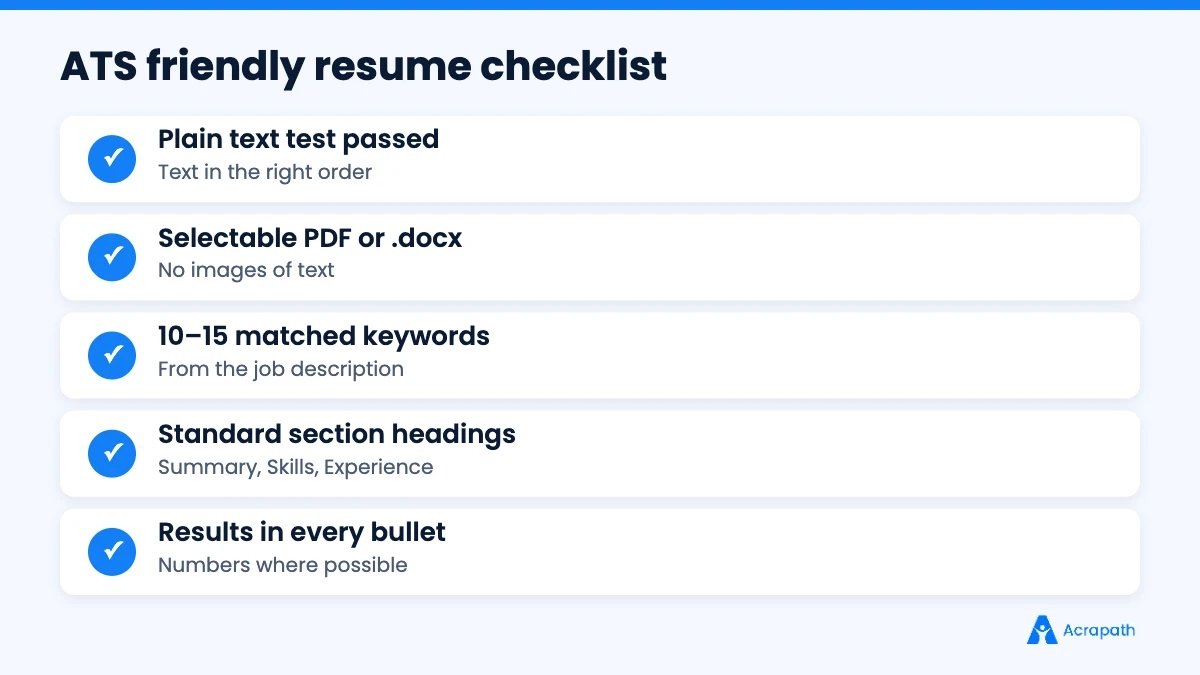
Match 10–15 important keywords from the job post, including tools, skills, certifications and job titles, and use both full terms and acronyms.
Test your resume by copying it into a plain text file. If the text comes out jumbled, an ATS may read it the same way.
You've applied to dozens of jobs, and you're qualified for many of them. Yet the replies don't come. Sometimes the reason isn't your experience at all. It's that the software screening your resume couldn't read it properly, or couldn't find the words the recruiter searched for.
Most medium and large employers use an applicant tracking system (ATS) to collect, organise and search applications. A beautifully designed resume with columns and icons might impress a person, but software can turn it into scrambled text before a recruiter ever sees it.
This guide shows you how to build an ATS friendly resume that software can read and recruiters want to shortlist: how ATS software works, the right format, how to choose keywords, section-by-section tips, before-and-after examples and a quick test you can run before every application.
What Is an Applicant Tracking System (ATS)?
An applicant tracking system is software employers use to manage hiring. It collects applications, extracts information from resumes into a database, lets recruiters search and filter candidates, and tracks each candidate through interview stages to an offer. Popular systems include Workday, SuccessFactors, iCIMS, Greenhouse and many others.
ATS software is extremely common at large companies. Jobscan's 2026 report detected an ATS on the career pages of 97.4% of Fortune 500 companies. Many smaller companies and job portals use similar tools to sort applications.
How an ATS Reads Your Resume
Understanding the process helps you see why format and keywords matter.
Parsing: the ATS extracts text from your file and tries to sort it into fields such as name, contact details, job titles, employers, dates, skills and education.
Storing: your parsed profile is saved in the company's candidate database.
Searching and filtering: recruiters search the database by keywords, job titles, skills, location or experience, or apply knockout questions such as "Do you have a valid licence?"
Ranking or matching: some systems score how closely your profile matches the job description.
Human review: a recruiter reads the shortlisted resumes.
If parsing fails, your experience may land in the wrong fields or disappear. If your resume lacks the keywords a recruiter searches for, you may never appear in results, even if you're a strong fit.
ATS myths vs facts
Myth | Fact |
|---|---|
"The ATS rejects most resumes automatically." | Many systems mainly store and rank resumes; recruiters set filters and make decisions. |
"You need a special ATS template." | A clean, simple layout in a standard file format works for most systems. |
"More keywords always means a better score." | Stuffing keywords makes your resume unreadable for the human reviewer. |
"PDFs never work." | Text-based PDFs work in most modern systems, unless the employer asks for Word. |
"Design doesn't matter at all." | Clear headings and spacing still help recruiters read quickly after the ATS. |
ATS Friendly Resume Format: The Rules
Formatting is where most resumes go wrong. Follow these rules and most ATS software will read your resume correctly.
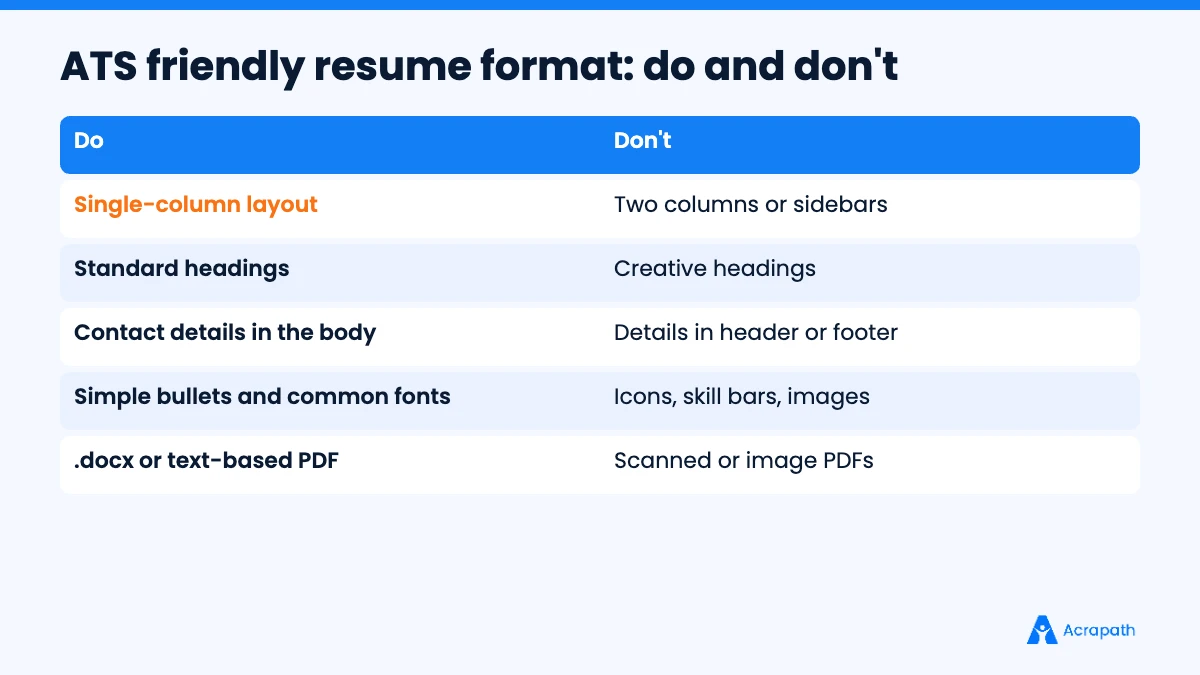
Use a single-column layout. Two-column designs can be read across both columns at once, mixing up your content.
Avoid tables, text boxes and graphics for important information. Many parsers skip or scramble them.
Keep contact details in the main body, not in the document header or footer.
Use standard section headings: Summary, Skills, Work Experience, Education, Certifications, Projects.
Choose a common font such as Arial, Calibri, Helvetica or Georgia, at 10–12 points.
Use simple bullet points (round or square), not icons or symbols.
Write dates consistently, for example "Jan 2024 – Present".
Avoid images, logos, skill bars and charts. An ATS can't read a five-star skill rating.
Save as .docx or a text-based PDF, and follow any format the employer requests.
Name your file clearly, such as "Priya-Sharma-Data-Analyst-Resume.pdf".
How to Choose the Right Keywords
Keywords are the skills, tools, qualifications and job titles recruiters search for. The best source is the job description itself.
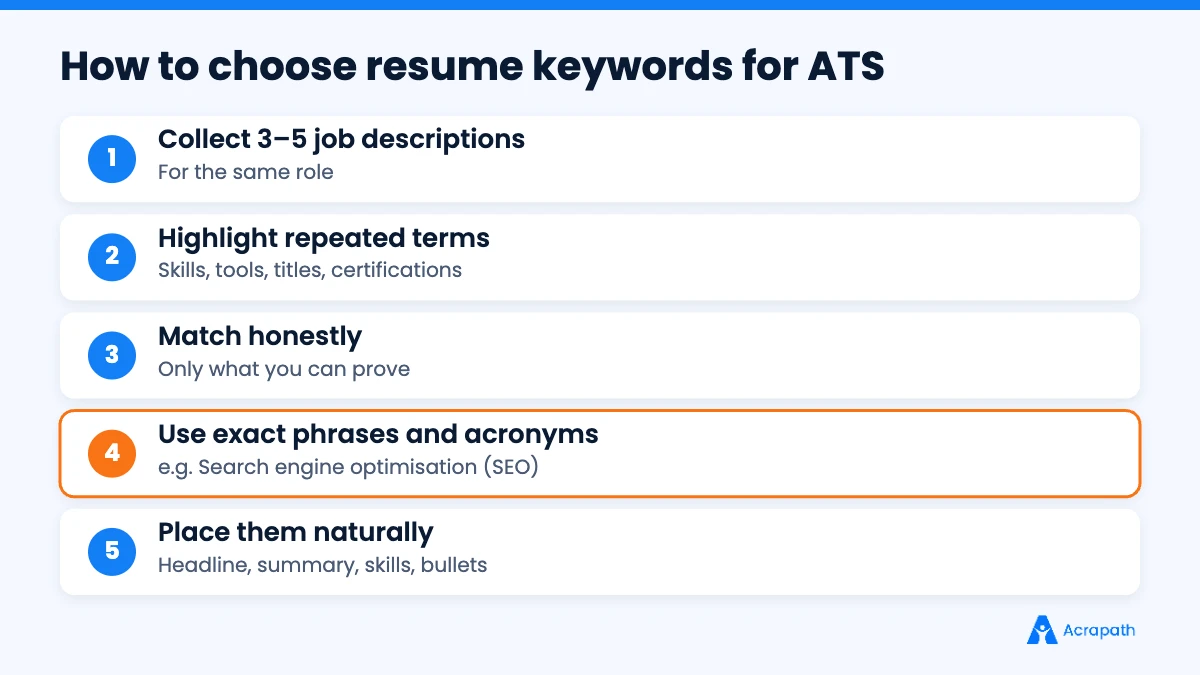
Step 1: Collect 3–5 similar job descriptions
Look at postings for the same role at different companies. Repeated terms are the ones employers care about most.
Step 2: Highlight the important terms
Mark hard skills (such as "financial modelling" or "SQL"), tools ("Salesforce", "Tally", "Figma"), certifications ("PMP", "ACCA"), job titles ("Business Development Executive") and key responsibilities ("vendor management").
Step 3: Match them honestly to your experience
Only include keywords you can back up in an interview. List each one where it truthfully applies: in your skills section and, ideally, in a bullet that shows you using it.
Step 4: Use exact phrases and both versions of acronyms
If the job says "search engine optimisation", use that phrase. Add the acronym once too: "Search engine optimisation (SEO)". Recruiters may search either version.
Step 5: Mirror the job title where it's accurate
If your title was "Associate – Client Servicing" and the job is "Account Manager", you can add a headline such as "Account Manager | Client Servicing | B2B SaaS" at the top, as long as it fairly describes your work.
Step 6: Place keywords naturally
Spread them across your headline, summary, skills section and experience bullets. Ten to fifteen well-placed keywords usually beat forty crammed into one list.
Section-by-Section: Building an ATS Friendly Resume
Contact details
Name, phone number, professional email, city and country, and LinkedIn URL. Put them at the top of the main page, not in the header.
Headline
One line under your name that matches your target role, such as "Data Analyst | SQL, Excel, Power BI | E-commerce".
Summary
Two to three lines with your role, years of experience, top skills and one result. Include two or three main keywords naturally.
Skills
A simple list of 8–15 skills and tools grouped by type, for example "Tools: Excel, Power BI, SQL" and "Skills: forecasting, dashboarding, stakeholder reporting".
Work experience
For each role: job title, company, location and dates on separate lines or one clear line. Then 3–6 bullets that start with an action verb, include a keyword where relevant and end with a result.
Education and certifications
Degree, institution and year. List certifications with their full name and issuing body.
Projects (especially for freshers and career switchers)
Project title, tools used and outcome. Projects are a great place to add keywords honestly when your work experience is limited.
Our complete resume guide covers each section in more depth, and role-specific guides like our software engineer resume ATS tips, sales executive resume guide and staff nurse resume guide show keywords for those roles.
Before and After: ATS Friendly Bullet Points
Before (weak for ATS and recruiters) | After (keyword-rich and specific) |
|---|---|
Handled social media for clients | Managed Instagram and LinkedIn content calendars for 6 B2B clients, growing average engagement by 30% in 6 months |
Responsible for accounts work | Prepared monthly GST returns and bank reconciliations in Tally for 120+ vendors with zero late filings |
Worked on the company website | Built responsive React components and REST API integrations that cut page load time by 40% |
Did sales for the company | Closed ₹45 lakh in new B2B SaaS revenue in FY 2025–26, achieving 112% of annual target |
Each improved bullet names the tool or skill, describes the action and ends with a measurable result. That works for both the software and the human reader.
How Recruiters Search an ATS
Recruiters rarely read every application in order. Instead, they search the database, much like you search the web. A recruiter hiring a digital marketer might search for:
"digital marketing" AND ("Google Ads" OR "PPC") AND (SEO OR "search engine optimisation") AND Delhi
If your resume says "online promotions" instead of "digital marketing", or "paid campaigns" without "Google Ads", you may not appear in that search, even with the right experience. That's why exact, commonly used terms matter more than clever wording.
Recruiters also filter by location, years of experience, current job title and sometimes education. Keep your location, dates and titles clear and accurate so these filters work in your favour.
How to Tailor Your Resume in 15 Minutes
Tailoring every application sounds exhausting, but it doesn't have to be. Keep a master resume with all your experience, then follow this quick routine for each job:
Minutes 1–3: read the job description and highlight the top five requirements and key tools.
Minutes 4–7: update your headline and summary to match the role title and top skills.
Minutes 8–11: reorder your skills list so the most relevant ones come first, and add any missing keywords you genuinely have.
Minutes 12–14: adjust two or three bullets in your latest role to use the job's language and highlight matching results.
Minute 15: run the plain text test and save the file with your name and the role.
Fifteen minutes per application, focused on roles you actually fit, will usually get more responses than sending the same resume everywhere.
Do Cover Letters Matter for ATS?
Some applicant tracking systems store cover letters alongside your resume, and recruiters may read them for shortlisted candidates. If a cover letter is requested, keep it short, use one or two of the job's main keywords naturally and explain why you fit the role. Never paste your whole resume into it. Your resume still does most of the work.
How to Test Your Resume Before You Apply
You don't need paid tools to catch most problems.
The plain text test: copy all the text from your resume and paste it into a plain text editor. If sections appear out of order, words are joined together or information is missing, an ATS may have the same problem.
The PDF check: open your PDF and try selecting the text. If you can't select it, it's an image and can't be read.
The keyword check: compare your resume with the job description and tick off the top 10–15 requirements.
The human check: ask a friend to read your resume for 30 seconds and tell you your target role and top skills. If they can't, simplify it.
ATS Tips for Freshers and Career Switchers
Lead with skills and projects if your work history is short or in a different field.
Use the target role's language in your headline and summary.
Include internships, freelance work and academic projects with tools and outcomes.
List relevant coursework and certifications using the exact names employers use.
Our guide to a resume with no experience shows how to structure a fresher resume, and how to switch careers explains how to reposition your experience for a new field.
Common ATS Resume Mistakes
Fancy templates with columns, icons and progress bars
Contact details in the header or footer
Creative headings like "My Journey" instead of "Work Experience"
Keyword stuffing, including hidden white text, which recruiters can spot and dislike
Using one resume for every job instead of tailoring keywords
Uncommon file types or image-based PDFs
Spelling mistakes in key terms, which stop searches from finding you
After the ATS: Impress the Human Reader
Getting through the software is only the first step. A recruiter will then spend a short time deciding whether to call you. Make that easy: a clear headline, a strong summary, results in every bullet and a clean layout. Then prepare for the next stage with our interview preparation guide, and keep your search moving with our 30-day plan to find a job fast.
Conclusion
An ATS friendly resume is simple to read and rich in the right keywords. Use a single-column layout with standard headings, keep contact details in the main body, avoid tables and graphics, and save in a format the employer accepts. Then tailor 10–15 keywords from each job description into your headline, summary, skills and experience, and test the result before you apply.
Do this for every application and more of your resumes will reach a real person, which is where interviews start.
Ready to apply? Browse jobs on Acrapath and set up alerts for roles that match your skills.
- #ATS friendly resume
- #ATS resume format
- #resume keywords
- #applicant tracking system
- #resume tips
Frequently asked questions
What is an ATS friendly resume?
An ATS friendly resume is formatted so applicant tracking software can read it correctly and contains the keywords recruiters search for. It uses a single-column layout, standard headings, a common font, no tables or graphics, contact details in the main body and skills that match the job description.
Is PDF or Word better for ATS?
Most modern applicant tracking systems read both .docx files and text-based PDFs. Use a PDF exported from a word processor so the text is selectable, and avoid scanned or image-based PDFs. If the employer asks for a specific format, always follow their instructions.
How many keywords should a resume have?
Focus on quality rather than a number. Matching around 10–15 of the most important skills, tools, certifications and job titles from the job description usually works well, as long as you can support each one with real experience and they appear naturally in your summary, skills and bullets.
Do tables and columns affect ATS?
They can. Some applicant tracking systems read multi-column layouts across the page, mixing up your content, and may skip text inside tables, text boxes, headers and footers. A simple single-column layout with standard headings is the safest choice for important information.
How can I check if my resume is ATS friendly?
Copy your resume text into a plain text editor and check that it appears in the right order with nothing missing. Make sure your PDF text is selectable, compare your resume with the job description for key terms and ask someone to skim it for 30 seconds.